💡 Please review the newer tests.
Ever wondered how to save some CPU cycles on a very busy or slow x86 system when it comes to SSH/SCP transfers?
Here is how we performed the benchmarks, in order to answer the above question:
- 41 MB test file with random data, which cannot be compressed – GZip makes it only 1% smaller.
- A slow enough system – Bifferboard. Bifferboard CPU power is similar to a Pentium @ 100Mhz.
- The other system is using a dual-core Core2 Duo @ 2.26GHz, so we consider it fast enough, in order not to influence the results.
- SCP file transfer over SSH using OpenSSH as server and client.
As stated at the Ubuntu man page of ssh_config, the OpenSSH client is using the following Ciphers (most preferred go first):
aes128-ctr,aes192-ctr,aes256-ctr,arcfour256,arcfour128,
aes128-cbc,3des-cbc,blowfish-cbc,cast128-cbc,aes192-cbc,
aes256-cbc,arcfour
In order to examine their performance, we will transfer the test file twice using each of the ciphers and note the transfer speed and delta. Here are the shell commands that we used:
for cipher in aes128-ctr aes192-ctr aes256-ctr arcfour256 arcfour128 aes128-cbc 3des-cbc blowfish-cbc cast128-cbc aes192-cbc aes256-cbc arcfour ; do
        echo "$cipher"
        for try in 1 2 ; do
                scp -c "$cipher" test-file root@192.168.100.102:
        done
done
You can review the raw results in the “ssh-cipher-speed-results.txt” file. The delta difference between the one and same benchmark test is within 16%-20%. Not perfect, but still enough for our tests.
Here is a chart which visualizes the results:
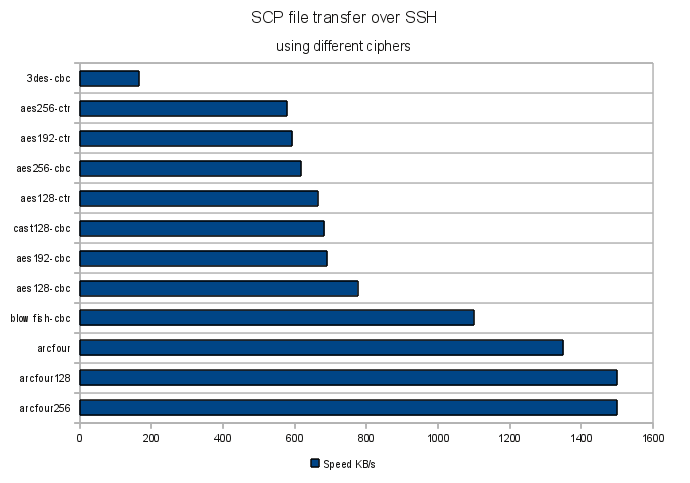
The clear winner is Arcfour, while the slowest are 3DES and AES. Still the question if all OpenSSH ciphers are strong enough to protect your data remains.
It’s worth mentioning that the results may be architecture dependent, so test for your platform accordingly.
Also take a look at the below comment for the results of the “i7s and 2012 xeons” tests.
Resources:

 /contrib/famzah
Pingback: Secure NAS on Bifferboard running Debian « /contrib/famzah
June 21, 2011 at 7:34 pm
I know this post is over a year old, but I stumbled across it trying to find a good cipher preference list, as well as exactly what ciphers are supported (are there more than is found in ssh_config(5)?)
At any rate, with regards to your benchmark, you’re seeing these results, because your CPU is the bottleneck. I don’t know what system you ran your tests on, but on any modern system, the disk becomes the bottleneck, and you’ll get comparable performance out of all ciphers. Same would be said if your network was the bottleneck.
What would make a great post is the amount of network bandwidth that each cipher uses, without compression, and compare these to overall security of each cipher. For example, does “blowfish-cbc” use the least amount of network overhead when transferring the data? The blowfish-cbc algorithm has shown to be comparable in strength to AES, and according to your tests, it’s a faster cipher (although most of the Internet will say that AES is substantially faster than Blowfish in general). So, “blowfish-cbc” might be a good-all-around cipher for OpenSSH.
These sort of details are what intrigues myself.
June 22, 2011 at 9:19 am
Yeap, these benchmarks focus on the CPU usage. The bottleneck depends pretty much on the particular machines load. If those were nodes doing some intensive mathematics computations, and you were about to backup them, then the CPU may easily turn out to be a bottleneck again.
Though you are right that it’s the disk system which is usually the slowest one. Sometimes the network too, yes, again depending on your particular use-case.
These tests were done in regards to the following article, where the CPU is the bottleneck:
November 21, 2012 at 10:57 am
I confirm you benchmarks on 2012 hardware (i7s and 2012 xeons) with one notable exception: blowfish is as slow as AESs
November 21, 2012 at 11:31 am
Thanks for sharing, much appreciated!
April 18, 2013 at 9:31 am
From today’s situation i confirm that aes can go even more than double in some situations. I started transferring a bunch of big files(20GB total, average of 1.5 GB each) and seeing that it will take about 30min i decided to restart transfer with blowfish, knowing this should help me. I ended going back to aes.
aes=11MB/s
blowfish=5MB/s
The source is a dual xenon G6 server with sas raid, destination is a i5 laptop(15% load anyway).
The bottleneck in my case is for sure the network. My entire building is connected in 1GB but it happens that i use a 100MB switch for my laptop.
January 14, 2013 at 4:33 pm
During the same test:
Cipher 3des-cbc
mysql-5.6.7-rc-debian6.0-x86_64.deb 100% 282MB 11.7MB/s 00:24
Cipher arcfour
mysql-5.6.7-rc-debian6.0-x86_64.deb 100% 282MB 93.9MB/s 00:03
January 15, 2013 at 2:31 am
Be careful, depending on your kernel version, usage of 64-bit or not, and maybe your CPU capabilities (grep ^flags /proc/cpuinfo | head -n 1), performance may vary drastically.
I noticed that on some not-too-old kernel and 64-bit arch, and fairly recent hardware, AES was very fast. Usually faster thant blowfish. I believe CPU capabilities may be involved, but mostly, I think the assembly implementation of some cipher algorithms (for some arch) within Linux is making a BIG difference.
I used to have a Pentium Pro 233 Mhz server which was very slow with scp, so I had to use “-c blowfish” every time with it, in order to achieve 8MB/s (otherwise, I hitted around 2 or 3 MB/s). When a replaced the machine by a new one, I was very surprised to find that using blowfish was actually *SLOWING* things down.
So it is not really the algorithm performance your testing, but rather the combination algoritm/kernel/arch/hardware…
January 15, 2013 at 8:49 pm
Yeap, you’re perfectly correct. Furthermore, as you’ll see in the following comment, some processors have started to integrate hardware encryption engines, which usually make at least AES pretty fast, because it’s considered very secure and widely used.
January 15, 2013 at 1:47 pm
Hi, here are my result, with a 168MB file and ssh on localhost:
aes128-ctr
test-file 100% 168MB 2.8MB/s 01:01
test-file 100% 168MB 2.8MB/s 01:01
aes192-ctr
test-file 100% 168MB 2.3MB/s 01:12
test-file 100% 168MB 2.2MB/s 01:16
aes256-ctr
test-file 100% 168MB 2.3MB/s 01:12
test-file 100% 168MB 2.4MB/s 01:11
arcfour256
test-file 100% 168MB 6.7MB/s 00:25
test-file 100% 168MB 5.2MB/s 00:32
arcfour128
test-file 100% 168MB 4.4MB/s 00:38
test-file 100% 168MB 5.8MB/s 00:29
aes128-cbc
test-file 100% 168MB 9.9MB/s 00:17
test-file 100% 168MB 10.5MB/s 00:16
3des-cbc
test-file 100% 168MB 1.8MB/s 01:31
test-file 100% 168MB 1.8MB/s 01:36
blowfish-cbc
test-file 100% 168MB 5.6MB/s 00:30
test-file 100% 168MB 6.2MB/s 00:27
cast128-cbc
test-file 100% 168MB 4.0MB/s 00:42
test-file 100% 168MB 4.2MB/s 00:40
aes192-cbc
test-file 100% 168MB 9.3MB/s 00:18
test-file 100% 168MB 10.5MB/s 00:16
aes256-cbc
test-file 100% 168MB 11.2MB/s 00:15
test-file 100% 168MB 9.9MB/s 00:17
arcfour
test-file 100% 168MB 8.0MB/s 00:21
test-file 100% 168MB 8.0MB/s 00:21
If something seems strange to you, it’s normal, I’m using a Via C7 with Padlock activated in OpenSSL, so that’s why cbc algorithms are much faster. But thanks for the initial benchmark, it helps a lot 🙂
February 7, 2013 at 12:26 pm
Are your test with or without compression enable?
February 13, 2013 at 11:07 am
I suggest using ssh rather than scp to measure the encryption speed.
I would replace the scp line in your above script with the following line:
ssh -c “$cipher” root@127.0.0.1 “cat – >/dev/null” < test-file
this just does SSH to localhost, pushing the test-file through the tunnel and discarding the file at the end of the tunnel.
No disk writes involved here.
February 15, 2013 at 9:52 am
Good idea. It does eliminate disk writes which is good if I/O is becoming the bottleneck. To completely eliminate I/O (both writes and reads), you can use the following:
dd if=/dev/zero bs=1M count=50 | ssh root@127.0.0.1 “cat – >/dev/null” # copy 50MB zeroes
Such an input is very easy to be compressed (as it’s only zeroes), so we need to make sure that compression is turned off.
February 15, 2013 at 10:19 am
To make sure compression is off, use `-o “Compression no”` option:
dd if=/dev/zero bs=1M count=50 | ssh -o “Compression no” root@127.0.0.1 “cat – >/dev/null”
September 17, 2013 at 11:40 am
aes128-ctr
10485760 bytes (10 MB) copied, 38.0164 seconds, 276 kB/s
real 0m33.143s
aes192-ctr
10485760 bytes (10 MB) copied, 46.462 seconds, 226 kB/s
real 0m37.775s
aes256-ctr
10485760 bytes (10 MB) copied, 69.5129 seconds, 151 kB/s
real 0m42.308s
arcfour256
10485760 bytes (10 MB) copied, 39.0557 seconds, 268 kB/s
real 0m12.082s
arcfour128
10485760 bytes (10 MB) copied, 19.4239 seconds, 540 kB/s
real 0m11.903s
aes128-cbc
10485760 bytes (10 MB) copied, 33.2298 seconds, 316 kB/s
real 0m28.588s
3des-cbc
10485760 bytes (10 MB) copied, 114.515 seconds, 91.6 kB/s
real 1m45.715s
blowfish-cbc
10485760 bytes (10 MB) copied, 22.7146 seconds, 462 kB/s
real 0m18.326s
cast128-cbc
10485760 bytes (10 MB) copied, 36.933 seconds, 284 kB/s
real 0m32.529s
aes192-cbc
10485760 bytes (10 MB) copied, 41.3596 seconds, 254 kB/s
real 0m32.877s
aes256-cbc
10485760 bytes (10 MB) copied, 63.0821 seconds, 166 kB/s
real 0m35.925s
arcfour
10485760 bytes (10 MB) copied, 17.1482 seconds, 611 kB/s
real 0m12.555s
September 17, 2013 at 11:44 am
Sorry, i missed note for the result above:
I replaced the “cat” command to “time cat – >/dev/null”. It gives only data transfer time. the connection/negotiation time is the difference between the time from dd and time from cat.
September 20, 2013 at 8:20 am
Thanks for sharing. So the results are more or less similar, which is good. I’m surprised by the extremely long time it needs for the connection to be negotiated. What hardware and software platform did you test this on? Why is transfer so slow (90 to 611 kB/s)?
December 15, 2014 at 6:35 pm
I’m transferring to a QNAP NAS (ARMv5). Specifying the cipher makes the backup go way faster.
3des-cbc allows 1,1 MB/s
my default (aes128-ctr) allows 4,5MB/s
arcfour128 allows 7 MB/s
That’s a pretty big difference for a many gigabyte backup.
December 15, 2014 at 6:40 pm
Correct, if you are ready to pay the price for a possibly weaker encryption strength. 🙂
January 9, 2015 at 5:48 pm
On a Intel(R) Xeon(R) CPU E5-2620 v2 @ 2.10GHz with 2x 10G LACP Network on SSD Raid1 6Gbit/s I got:
aes128-ctr
test-file 100% 1024MB 41.0MB/s 00:25
test-file 100% 1024MB 56.9MB/s 00:18
aes192-ctr
test-file 100% 1024MB 51.2MB/s 00:20
test-file 100% 1024MB 51.2MB/s 00:20
aes256-ctr
test-file 100% 1024MB 44.5MB/s 00:23
test-file 100% 1024MB 46.6MB/s 00:22
arcfour256
test-file 100% 1024MB 102.4MB/s 00:10
test-file 100% 1024MB 170.7MB/s 00:06
arcfour128
test-file 100% 1024MB 146.3MB/s 00:07
test-file 100% 1024MB 170.7MB/s 00:06
aes128-cbc
test-file 100% 1024MB 170.7MB/s 00:06
test-file 100% 1024MB 128.0MB/s 00:08
3des-cbc
test-file 100% 1024MB 16.5MB/s 01:02
test-file 100% 1024MB 16.5MB/s 01:02
blowfish-cbc
test-file 100% 1024MB 60.2MB/s 00:17
test-file 100% 1024MB 64.0MB/s 00:16
blowfish
test-file 100% 1024MB 60.2MB/s 00:17
test-file 100% 1024MB 64.0MB/s 00:16
cast128-cbc
test-file 100% 1024MB 56.9MB/s 00:18
test-file 100% 1024MB 56.9MB/s 00:18
aes192-cbc
test-file 100% 1024MB 146.3MB/s 00:07
test-file 100% 1024MB 146.3MB/s 00:07
aes256-cbc
test-file 100% 1024MB 146.3MB/s 00:07
test-file 100% 1024MB 146.3MB/s 00:07
arcfour
test-file 100% 1024MB 128.0MB/s 00:08
test-file 100% 1024MB 146.3MB/s 00:07
thats bad in my opinion … ;/
January 12, 2015 at 10:13 pm
Thanks for the benchmark info.
I can’t say if that’s bad, but there is something interesting here. Look how fast the AES-CBC tranfers are. This is an indication that you’re taking advantage of the AES hardware optimization in your CPU: http://en.wikipedia.org/wiki/AES_instruction_set
Pingback: OpenSSH ciphers performance benchmark (update 2015) | /contrib/famzah
Pingback: OpenSSH cipher performance – /dev/blog