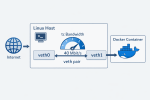
TL;DR: if a container uses the usual Docker bridge networking, you can often limit its download speed from the host with tc and a TBF qdisc. The useful detail is that the container is typically connected through a veth pair, so traffic that is incoming (download) for the container is outgoing (upload) on the host-side veth.
Limiting upload is trivial because Linux shapes egress directly. Limiting download is more awkward, because the packets are already arriving from the outside world and you can’t control how fast a remote host sends packets. But with the usual Docker bridge setup, the host is effectively the last router hop before the container. Once the packets are about to cross from the host namespace into the container namespace, they are host egress and container ingress at the same time. That is the point where we can apply the limit.
This is not meant to be a universal recipe for every Docker setup. It is a short working example for the common case where the container sits behind the default bridge plumbing and has a host-side veth. If you use network_mode: host, macvlan, ipvlan, rootless Docker, or anything more exotic, this exact approach may not apply.
Here is the script I used for one of my Compose services:
cd ~/your-docker-project-compose-dir

CID=$(docker compose ps -q ollama)
PID=$(docker inspect -f '{{.State.Pid}}' "$CID")
IFACE=$(sudo nsenter -t "$PID" -n sh -c "ip -o -4 route show to default | awk '{print \$5}'")
IDX=$(sudo nsenter -t "$PID" -n -m cat /sys/class/net/$IFACE/iflink)
VETH=$(ip -o link | awk -F': ' -v idx="$IDX" '$1 == idx {print $2}' | cut -d@ -f1)

echo "CID=$CID"
echo "PID=$PID"
echo "IFACE=$IFACE"
echo "IDX=$IDX"
echo "VETH=$VETH"

sudo tc qdisc replace dev "$VETH" root tbf rate 40000kbit burst 32kbit latency 400ms
sudo tc qdisc show dev "$VETH"
In this example, 40000kbit means 40 Mbit/s, which is about 5 MBytes/s. The script finds the container PID, enters its network namespace just long enough to discover the default interface, resolves the matching host-side peer, and then attaches the rate limit there.
One practical caveat is that the host-side veth name is not stable across container recreation. If you rebuild or recreate the container, run the script again. To remove the limit later, resolve $VETH the same way and then run sudo tc qdisc del dev "$VETH" root.

