/contrib/famzah

Enthusiasm never stops


1 Comment

Two AWS CLI tips for S3 — UTF-8 when piping, and migrating the Storage Class

While working on the “youtube-mp3-archive” project, I stumbled across two issues which are worth to be documented for future use.

“aws s3 ls” shows “???” instead of the UTF-8 key names of the S3 objects

On my machine this happens when I pipe the output of “aws s3 ls” to another program. Here is an example:

$ aws s3 ls --recursive s3://youtube-mp3.famzah/ | tee | grep 4185710
2016-10-30 08:08:49    4185710 mp3/Youtube/??????? - ?? ???? ?????-BF6KuR8vWN0.mp3

There is already a discussion about this at the AWS CLI project. The solution in my case was to tamper with the PYTHONIOENCODING environment variable and force UTF-8:

$ PYTHONIOENCODING=utf8 aws s3 ls --recursive s3://youtube-mp3.famzah/ | tee | grep 4185710
2016-10-30 08:08:49    4185710 mp3/Youtube/Аналгин - Тя беше ангел-BF6KuR8vWN0.mp3

How to convert all stored S3 objects to another Storage Class

As already explained, the Storage Class cannot be set on a per-bucket basis. It must be specified with each upload operation in your client.

The migration procedure is already documented at the AWS CLI project. Here are the commands to check the current Storage Class of all objects in an S3 bucket, and how to convert them to a different Storage Class:

# all our S3 objects are using the "Standard" Storage Class
$ aws s3api list-objects --bucket youtube-mp3.famzah | grep StorageClass | sort | uniq -c
749  "StorageClass": "STANDARD"

# convert without re-uploading the objects from your computer
aws s3 cp --recursive --storage-class STANDARD_IA s3://youtube-mp3.famzah/ s3://youtube-mp3.famzah/

# all our S3 objects are now using the "Standard-Infrequent" Storage Class
$ aws s3api list-objects --bucket youtube-mp3.famzah | grep StorageClass | sort | uniq -c
749  "StorageClass": "STANDARD_IA"

The reason to use a different Storage Class is pricing.

AWS S3 icon by isdownrightnow.net


2 Comments

Interactively ping multiple hosts

Have you ever needed to ping a group of hosts because you are rebooting them at once and waiting for them to boot back online? Or have you ever tried to debug if a packet loss is limited only to certain destinations by pinging a dozen of different hosts from the same location?

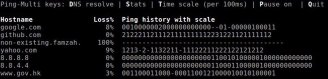
Whatever the reason to ping multiple hosts at once, you can use “ping-multi” to view all results at once in a text console. It reads hosts from a file and sends ICMP ECHO_REQUEST to them. This is the same as the standard “ping“, only executed in parallel for many hosts.

You can also access in real-time the following statistics: Last round-trip-time (RTT), Packet loss %, Average RTT, Minimum RTT, Maximum RTT, Standard deviation of the RTT, Received and Transmitted packets count.

The ping history can be displayed either in a simple view showing received (.) and lost (X) reply packets, or as a scaled view which visualizes the RTT value using the numbers between 0 and 9.

Screenshot 1:

Screenshot 2:

“Ping-multi” is available as a free open-source project at: https://github.com/famzah/ping-multi


Leave a comment

Dynamic DNS using AWS Route 53

The Internet ecosystem and technologies advanced so much lately that you can rebuild an entire business from scratch in a few hours of coding and at pretty acceptable costs. I’m referring to the dynamic DNS (aka. DDNS or DynDNS) service which was a hit a few years back. It took me less than a hundred lines of code to create a simple dynamic DNS using AWS Route 53. The AWS API and backend provide the DNS service, while the free service “ipify” lets you look up your real remote IP address. While this solution is not free as speech, it’s free as beer and costs less than a dollar per month.

DNS icon by PRchecker


4 Comments

Goodbye Acronis cloud — Hello Encrypted S3 backup!

Over time the backup strategies for my personal laptop are changing in the search for the most cost-effective, robust and secure solution. And it must be able to back up both my Windows host and Linux virtual machine.

  • I tried a backup to an AWS EC2 instance for a while but this was expensive.
  • I then changed to Acronis Cloud backup because I’m very satisfied with their local hard disk backups. But their online cloud backup was an unpleasant experience. The cloud backup failed without indication in the taskbar; when I clicked for more info, the cryptic “error(0x49052524) in lib; please contact support” was displayed; I contacted support to no avail — but they wanted me to reinstall; it fixed itself after a dozen of days; this has happened two times in a few months; last but not least, when I wanted to browse my online backup the web interface was really slow. Sorry Acronis, but you really disappointed me.

Now I’ve come to an open-source solution for my backup needs — the Encrypted S3 Backup written in Bash based on the official Amazon Command-Line Interface (CLI). This simple backup system leaves control and visibility in your hands. Additionally, the backup scripts are very small and you can easily audit them. The README provides all information about the design, security, usage, disaster recovery, etc. More or less, it’s a solution for Linux technical guys, and not really suited for end-uses who should try Duplicati instead. And it doesn’t back up an “image” of your system but it is file-based. Only the file data is archived, so you can’t restore the file owners, permissions and other meta info.

Let’s review the pricing side. In my case I’m doing a daily backup for 125 GB data in 320,000 files.

  • The incremental daily backup costs me $2.73 per month. 89% is the cost for S3 (mainly the GB-storage cost) and the rest is for bandwidth.
  • The initial one-time upload of 70 GB costed me $3.43. Expect about double for 125 GB.
  • The projected cost for a full restore is $11.59 where 96% is the price of the used bandwidth from S3 to Internet.
  • All prices are without taxes.

As far as performance is concerned, S3 is great!

  • Browsing my backup versions in the online S3 explorer is lightning fast.
  • The daily sync for 125 GB data in 320,000 files takes 23 minutes. I don’t change a lot of files on my laptop during my daily activities.
  • My initial upload performed with a speed of 10 MBytes/s, and it could have been faster if I had more than 80 Mbit/s Internet at my disposal.

Note that in the end you need to trust AWS S3 to encrypt your data server-side, and then to completely forget your original data.

Backup icon by PRchecker


2 Comments

Bash: Process null-terminated results piped from external commands

Usually when working with filenames we need to terminate each result record uniquely using the special null-character. That’s because filenames may contain special symbols, including white-space and even the newline character “\n”.

There is already a great answer how to do this in the StackOverflow topic “Capturing output of find . -print0 into a bash array”. The proposed solution doesn’t invoke any sub-shells, which is great, and also explains all caveats in detail. In order to become really universal, this solution must not rely on the static file-descriptor “3”. Another great answer at SO gives an example on how to dynamically use the next available file-descriptor.

Here is the solution which works without using sub-shells and without depending on a static FD:

a=()
while IFS='' read -r -u"$FD" -d $'\0' file; do
  # note that $IFS is having the default value here
  a+=("$file") # or however you want to process each file
done {FD}< <(find /tmp -type f -print0)
exec {FD}<&- # close the file descriptor

# the result is available outside the loop, too
echo "${a[0]}" # 1st file
echo "${a[1]}" # 2nd file

Terminal icon created by Julian Turner


52 Comments

C++ vs. Python vs. PHP vs. Java vs. Others performance benchmark (2016 Q3)

The benchmarks here do not try to be complete, as they are showing the performance of the languages in one aspect, and mainly: loops, dynamic arrays with numbers, basic math operations.

This is an improved redo of the tests done in previous years. You are strongly encouraged to read the additional information about the tests in the article.

Here are the benchmark results:

Language CPU time Slower than Language
version
Source
code
User System Total C++ previous
C++ (optimized with -O2) 0.899 0.053 0.951 g++ 6.1.1 link
Rust 0.898 0.129 1.026 7% 7% 1.12.0 link
Java 8 (non-std lib) 1.090 0.006 1.096 15% 6% 1.8.0_102 link
Python 2.7 + PyPy 1.376 0.120 1.496 57% 36% PyPy 5.4.1 link
C# .NET Core Linux 1.583 0.112 1.695 78% 13% 1.0.0-preview2 link
Javascript (nodejs) 1.371 0.466 1.837 93% 8% 4.3.1 link
Go 2.622 0.083 2.705 184% 47% 1.7.1 link
C++ (not optimized) 2.921 0.054 2.975 212% 9% g++ 6.1.1 link
PHP 7.0 6.447 0.178 6.624 596% 122% 7.0.11 link
Java 8 (see notes) 12.064 0.080 12.144 1176% 83% 1.8.0_102 link
Ruby 12.742 0.230 12.972 1263% 6% 2.3.1 link
Python 3.5 17.950 0.126 18.077 1800% 39% 3.5.2 link
Perl 25.054 0.014 25.068 2535% 38% 5.24.1 link
Python 2.7 25.219 0.114 25.333 2562% 1% 2.7.12 link

The big difference this time is that we use a slightly modified benchmark method. Programs are no longer limited to just 10 loops. Instead they run for 90 wall-clock seconds, and then we divide and normalize their performance as if they were running for only 10 loops. This way we can compare with the previous results. The benefit of doing the tests like this is that the startup and shutdown times of the interpreters should make almost no difference now. It turned out that the new method doesn’t significantly change the outcome compared to the previous benchmark runs, which is good as the old way of benchmarks seems also correct.

For the curious readers, the raw results also show the maximum used memory (RSS).

Brief analysis of the results:

  • Rust, which we benchmark for the first time, is very fast. 🙂
  • C# .NET Core on Linux, which we also benchmark for the first time, performs very well by being as fast as NodeJS and only 78% slower than C++. Memory usage peak was at 230 MB which is the same as Python 3.5 and PHP 7.0, and two times less than Java 8 and NodeJS.
  • NodeJS version 4.3.x got much slower than the previous major version 4.2.x. This is the only surprise. It turned out to be a minor glitch in the parser which was easy to fix. NodeJS 4.3.x is performing the same as 4.2.x.
  • Python and Perl seem a bit slower than before but this is probably due to the fact that C++ performed even better because of the new benchmark method.
  • Java 8 didn’t perform much faster as we expected. Maybe it gets slower as more and more loops are done, which also allocated more RAM.
  • Also review the analysis in the old 2016 tests for more information.

The tests were run on a Debian Linux 64-bit machine.

You can download the source codes, raw results, and the benchmark batch script at:
https://github.com/famzah/langs-performance

Update @ 2016-10-15: Added the Rust implementation. The minor versions of some languages were updated as well.
Update @ 2016-10-19: A redo which includes the NodeJS fix.
Update @ 2016-11-04: Added the C# .NET Core implementation.


Leave a comment

mpssh-py — half a million executions for 3 years

It’s “mpssh-py” 3rd birthday this year! 🙂

I did some stats analysis on my logs and they revealed the following:

  • 500.000 SSH executions by “mpssh-py” on my local machine for the last 3 years.
  • No bugs for the last 3 years.

This is a proof for the power of interpreted languages and that the single-responsibility design approach for programs helps in making them more reliable.

Font Awesome by Dave Gandy - http://fontawesome.io


47 Comments

C++ vs. Python vs. Perl vs. PHP performance benchmark (2016)

There are newer benchmarks: C++ vs. Python vs. PHP vs. Java vs. Others performance benchmark (2016 Q3)

The benchmarks here do not try to be complete, as they are showing the performance of the languages in one aspect, and mainly: loops, dynamic arrays with numbers, basic math operations.

This is a redo of the tests done in previous years. You are strongly encouraged to read the additional information about the tests in the article.

Here are the benchmark results:

Language CPU time Slower than Language
version
Source
code
User System Total C++ previous
C++ (optimized with -O2) 0.952 0.172 1.124 g++ 5.3.1 link
Java 8 (non-std lib) 1.332 0.096 1.428 27% 27% 1.8.0_72 link
Python 2.7 + PyPy 1.560 0.160 1.720 53% 20% PyPy 4.0.1 link
Javascript (nodejs) 1.524 0.516 2.040 81% 19% 4.2.6 link
C++ (not optimized) 2.988 0.168 3.156 181% 55% g++ 5.3.1 link
PHP 7.0 6.524 0.184 6.708 497% 113% 7.0.2 link
Java 8 14.616 0.908 15.524 1281% 131% 1.8.0_72 link
Python 3.5 18.656 0.348 19.004 1591% 22% 3.5.1 link
Python 2.7 20.776 0.336 21.112 1778% 11% 2.7.11 link
Perl 25.044 0.236 25.280 2149% 20% 5.22.1 link
PHP 5.6 66.444 2.340 68.784 6020% 172% 5.6.17 link

The clear winner among the script languages is… PHP 7. 🙂

Yes, that’s not a mistake. Apparently the PHP team did a great job! The rumor that PHP 7 is really fast confirmed for this particular benchmark test. You can also review the PHP 7 infographic by the Zend Performance Team.

Brief analysis of the results:

  • NodeJS got almost 2x faster.
  • Java 8 seems almost 2x slower.
  • Python has no significant change in the performance. Every new release is a little bit faster but overall Python is steadily 15x slower than C++.
  • Perl has the same trend as Python and is steadily 22x slower than C++.
  • PHP 5.x is the slowest with results between 47x to 60x behind C++.
  • PHP 7 made the big surprise. It is about 10x faster than PHP 5.x, and about 3x faster than Python which is the next fastest script language.

The tests were run on a Debian Linux 64-bit machine.

You can download the source codes, an Excel results sheet, and the benchmark batch script at:
https://github.com/famzah/langs-performance


Leave a comment

Convert human-readable sizes back to raw numbers

Ever needed to convert lots of lines with 1M or 1G to their raw number representation?

Here is a sample:

$ cat sample
26140   132K   1.9G   1.5G     ?K     0K     8K     0K   5% mysqld
26140   132K   1.9G   1.5G     ?K     4K     8K     0K   5% mysqld
26140   132K   1.9G   1.5G     ?K     0K     0K     0K   5% mysqld
26140   132K   1.9G   1.5G     ?K    -8K     0K     0K   5% mysqld
26140   132K   1.9G   1.6G     ?K     0K    20K     0K   5% mysqld
26140   132K   1.9G   1.6G     ?K     0K    56K     0K   5% mysqld
26140   132K   1.9G   1.7G     ?K    -4K     4K     0K   5% mysqld
26140   132K   1.9G   1.7G     ?K     0K    16K     0K   5% mysqld
26140   132K   1.9G   1.8G     ?K     0K     0K     0K   5% mysqld

The following Perl one-liner comes to the rescue:

perl -Mstrict -Mwarnings -n -e 'my %p=( K=>3, M=>6, G=>9, T=>12); s/(\d+(?:\.\d+)?)([KMGT])/$1*10**$p{$2}/ge; print'

In the end you get:

$ cat sample | perl -Mstrict -Mwarnings -n -e 'my %p=( K=>3, M=>6, G=>9, T=>12); s/(\d+(?:\.\d+)?)([KMGT])/$1*10**$p{$2}/ge; print'
26140   132000   1900000000   1500000000     ?K     0     8000     0   5% mysqld
26140   132000   1900000000   1500000000     ?K     4000     8000     0   5% mysqld
26140   132000   1900000000   1500000000     ?K     0     0     0   5% mysqld
26140   132000   1900000000   1500000000     ?K    -8000     0     0   5% mysqld
26140   132000   1900000000   1600000000     ?K     0    20000     0   5% mysqld
26140   132000   1900000000   1600000000     ?K     0    56000     0   5% mysqld
26140   132000   1900000000   1700000000     ?K    -4000     4000     0   5% mysqld
26140   132000   1900000000   1700000000     ?K     0    16000     0   5% mysqld
26140   132000   1900000000   1800000000     ?K     0     0     0   5% mysqld

You can now paste this output to Excel, for example, in order to create a nice chart of it.