/contrib/famzah

Enthusiasm never stops


Leave a comment

Authentication for google-sites-liberation

I am doing a regular backup of my Google Sites using the free tool google-sites-liberation. Out of the blue, today I got the following authentication error:

Aug 06, 2014 2:34:08 PM com.google.sites.liberation.export.Main doMain
SEVERE: Invalid User Credentials!
Exception in thread "main" java.lang.RuntimeException: com.google.gdata.client.GoogleService$InvalidCredentialsException: Invalid credentials
        at com.google.sites.liberation.export.Main.doMain(Main.java:89)
        at com.google.sites.liberation.export.Main.main(Main.java:97)
Caused by: com.google.gdata.client.GoogleService$InvalidCredentialsException: Invalid credentials
        at com.google.gdata.client.GoogleAuthTokenFactory.getAuthException(GoogleAuthTokenFactory.java:586)
        at com.google.gdata.client.GoogleAuthTokenFactory.getAuthToken(GoogleAuthTokenFactory.java:490)
        at com.google.gdata.client.GoogleAuthTokenFactory.setUserCredentials(GoogleAuthTokenFactory.java:336)
        at com.google.gdata.client.GoogleService.setUserCredentials(GoogleService.java:362)
        at com.google.gdata.client.GoogleService.setUserCredentials(GoogleService.java:317)
        at com.google.gdata.client.GoogleService.setUserCredentials(GoogleService.java:301)
        at com.google.sites.liberation.export.Main.doMain(Main.java:79)
        ... 1 more

This was followed by an email with subject “Google Account: sign-in attempt blocked”, which was a very useful hint by Google!

It turns out that they are now blocking login attempts from apps or devices that do not use modern security standards, according to their “Less secure apps” documentation.

Once I enabled the “Access for less secure apps”, I was able to export my Google sites using “google-sites-liberation”. It’s highly recommended that you disable the less secure authentication once you’ve finished the backup.

Leave a comment

Private networking per-process in Linux

This is a follow-up of the Private /tmp mount per-process in Linux. As already stated there, Linux namespaces offer great options for security.

In this article we will demonstrate the use of the “network” namespace which enables a process to have independent IPv4 and IPv6 stacks, network interfaces, IP routing tables, iptables firewall rules, the /proc/net and /sys/class/net directory trees, sockets, etc.

Here is a diagram to illustrate the concept:
Linux network namespace

First we start by creating a pair of “veth” network interfaces:

ip link add v-eth1 type veth peer name v-peer1
ip link set v-eth1 up
ip link set v-peer1 up

One of those interfaces will be used as a communication point from the side of the original default network namespace. We will assign “10.200.1.1” for IP address:

ifconfig v-eth1 10.200.1.1 netmask 255.255.255.0 up

It is time to enter the new network namespace. Once we have created the new namespace, we will associate the second interface “v-peer1” with it, then we will configure an IP address “10.200.1.2” and add a default route through the first interface which will act as a router:

export MAIN_NS_PID="$$"
unshare -n /bin/bash

#
# We are in a "/bin/bash" session in the NEW network namespace now.
#

ip link set lo up # activate the "loopback" interface

nsenter --net="/proc/$MAIN_NS_PID/ns/net" ip link set v-peer1 netns "$$" # join "v-peer1" into this namespace
ifconfig v-peer1 10.200.1.2 netmask 255.255.255.0 up
route add default gw 10.200.1.1 dev v-peer1

#
# Setup is done.
# You can now drop privileges and launch a daemon which will use this confined network namespace.
#

sudo -u www-data /etc/init.d/my-net-daemon start

The original default namespace, our original Linux installation, must be configured to act as a router. Otherwise the processes inside the new network namespace won’t have any Internet access. Configuring a Linux network router is a straightforward task:

echo 1 > /proc/sys/net/ipv4/ip_forward
iptables -P FORWARD DROP
iptables -F FORWARD

iptables -t nat -F
iptables -t nat -A POSTROUTING -s 10.200.1.0/255.255.255.0 -o eth0 -j MASQUERADE

iptables -A FORWARD -i eth0 -o v-eth1 -j ACCEPT
iptables -A FORWARD -o eth0 -i v-eth1 -j ACCEPT

Finally, you can enable inbound connections to the processes in the confined new network namespace. Let’s assume that you have a daemon listening on TCP port 10105. Here is how you can forward any new incoming connections to the processes inside the new network namespace:

iptables -t nat -A PREROUTING -i eth0 -p tcp --dport 10105 -j DNAT --to-destination 10.200.1.2

Pros: Using separate network namespaces gives us full network isolation and control over a group of processes. Additionally, we can match incoming packets against a process which is not possible in a standard “iptables” setup using the “-m owner” match extension. These are huge security benefits.

Cons: The technical implications are that the Linux host has to do (a lot) more work because of the DNAT/SNAT operations and their related connection tracking overhead. If you are running a high traffic server, you should plan and test accordingly. Furthermore, one additional network interfaces pair is created for each new network namespace. Linux can handle hundreds of network devices but still this is a factor to be considered.

The better security features outweigh the drawbacks in most use-cases though. Last but not least, it is very easily to run a process with completely detached network and this won’t cost us anything on the Linux host.

Resources:


1 Comment

Private /tmp mount per-process in Linux

I’ve been playing with Linux namespaces and the results are very satisfying. This process isolation has several benefits:

  • The setup is automatically destroyed when the process and its children exit — easy maintenance.
  • Non-privileged processes cannot alter the setup — great security.
  • The isolated resource type is completely invisible by processes in other namespaces — great security.
  • The setup is inherited by any forked children — great for security and maintenance.

If you review the man page of the “unshare” command or syscall, you will see that currently we can have the following private namespaces:

  • mount namespace — mounting and unmounting filesystems will not affect rest of the system, except for filesystems which are explicitly marked as shared
  • UTS namespace — setting hostname, domainname will not affect rest of the system
  • IPC namespace — the process will have independent namespace for System V message queues, semaphore sets and shared memory segments
  • network namespace — the process will have independent IPv4 and IPv6 stacks, IP routing tables, iptables firewall rules, the /proc/net and /sys/class/net directory trees, sockets, etc.
  • pid namespace (new) — children will have a distinct set of PID to process mappings from their parent
  • user namespace (new) — the process will have a distinct set of UIDs, GIDs and capabilities

In this article we will demonstrate the use of the “mount” namespace which lets us mount a filesystem per-process without affecting the rest of the system. Using such a private mount for “/tmp” has mainly security but also usability benefits.

Here are all the commands which you need, in order to start a process with a private “/tmp” directory:

TARGET_USER='www-data'
TARGET_CMD='/bin/bash' # but it can be any command
NEWTMP="$(mktemp -d)" # securely create a new empty tmp folder

chown "root:$TARGET_USER" "$NEWTMP"
chmod 770 "$NEWTMP"

unshare --mount -- /bin/bash -c "mount -o bind,noexec,nosuid,nodev '$NEWTMP' /tmp && sudo -u '$TARGET_USER' $TARGET_CMD"

A longer version with more explanations follow:

#
# setup operations done as "root"
#

root@vbox:~# TARGET_USER='www-data'
root@vbox:~# TARGET_CMD='/bin/bash' # but it can be any command
root@vbox:~# NEWTMP="$(mktemp -d)" # securely create a new empty tmp folder
root@vbox:~# chown "root:$TARGET_USER" "$NEWTMP"
root@vbox:~# chmod 770 "$NEWTMP"

#
# review the result in the real file-system "/tmp"
#

root@vbox:~# echo $NEWTMP
/tmp/tmp.IyoUhputAW

root@vbox:~# ls -la /tmp
total 60
drwxrwxrwt 12 root   root     12288 Jun  4 13:53 .
drwxr-xr-x 23 root   root      4096 Jan 24 15:31 ..
drwxrwxrwt  2 root   root      4096 Jun  1 22:54 .ICE-unix
drwxrwx---  2 root   www-data  4096 Jun  4 13:53 tmp.IyoUhputAW

root@vbox:~# ls -la "$NEWTMP"
total 16
drwxrwx---  2 root www-data  4096 Jun  4 13:53 .
drwxrwxrwt 12 root root     12288 Jun  4 13:53 ..

#
# start the non-privileged process with a private "/tmp" mount
#

root@vbox:~# unshare --mount -- /bin/bash -c "mount -o bind,noexec,nosuid,nodev '$NEWTMP' /tmp && sudo -u '$TARGET_USER' $TARGET_CMD"

#
# sample operations done inside the non-privileged process
#

www-data@vbox:~$ ls -la / | grep tmp
drwxrwx---   2 root www-data  4096 Jun  4 13:53 tmp

www-data@vbox:~$ touch /tmp/test-www-data-file

www-data@vbox:~$ ls -la /tmp # the process has a private "/tmp" mount
total 8
drwxrwx---  2 root     www-data 4096 Jun  4 13:55 .
drwxr-xr-x 23 root     root     4096 Jan 24 15:31 ..
-rw-r--r--  1 www-data www-data    0 Jun  4 13:55 test-www-data-file

#
# see the result in the real file-system "/tmp"
#

root@vbox:~# ls -la /tmp
total 60
drwxrwxrwt 12 root   root     12288 Jun  4 13:53 .
drwxr-xr-x 23 root   root      4096 Jan 24 15:31 ..
drwxrwxrwt  2 root   root      4096 Jun  1 22:54 .ICE-unix
drwxrwx---  2 root   www-data  4096 Jun  4 13:55 tmp.IyoUhputAW

root@vbox:~# echo "$NEWTMP"
/tmp/tmp.IyoUhputAW

root@vbox:~# ls -la "$NEWTMP"
total 16
drwxrwx---  2 root     www-data  4096 Jun  4 13:55 .
drwxrwxrwt 12 root     root     12288 Jun  4 13:53 ..
-rw-r--r--  1 www-data www-data     0 Jun  4 13:55 test-www-data-file

Note that we are mounting a directory inside another directory using the “bind” mount feature of Linux.

Resources:


Leave a comment

ProFTPD inheritance of “.ftpaccess” files

ProFTPD and Apache have a lot in common in their concept for inheriting the per-directory settings files. ProFTPD and Apache use “.ftpaccess” and “.htaccess” files respectively.

There is one substantial difference though. ProFTPD does not always look from the current directory to the very root “/” directory, because ProFTPD uses chroot() when the “DefaultRoot” directive is set to “~”, for example. Many distributions set this directive to “~” by default.

Let’s have an example:

  • “/home/$user/.ftpaccess” — a “.ftpaccess” file EXISTS
  • “/home/$user/private/files/” — no “.ftpaccess” file

Let’s also assume that an FTP user has “/home/$user/private/files” for a home directory in the “/etc/passwd” file. If this user logs in, ProFTPD will chroot() to the user’s home directory first. This will effectively make the per-session “/” root directory to start from “/home/$user/private/files”. Therefore, the ProFTPD process will have access to the following directories:

  • “/home/$user/private/files/and-any-subdirectories” — accessible as “/and-any-subdirectories”
  • “/home/$user/private/files/” — accessible as “/”
  • “/home/$user/private/” — not accessible
  • “/home/$user/” — not accessible (“/home/$user/.ftpaccess” — EXISTS but not accessible)
  • “/home/” — not accessible
  • “/” — not accessible

As a result, even that we have the file “/home/$user/.ftpaccess” it won’t take effect for the FTP user who has “/home/$user/private/files/” for their home directory.

An strace excerpt follows which shows the exact steps which ProFTPD performs when it logs in an FTP user with “DefaultRoot” setting configured to “~”:

root@mysrv:~# getent passwd nobody
nobody:x:99:99:Nobody:/:/sbin/nologin
root@mysrv:~# getent group 99
nobody:x:99:

root@mysrv:~# getent passwd ftpuser1
ftpuser1:x:5178:4388::/home/ftpuser1/private/public_upload:/dev/null
root@mysrv:~# getent group 4388
ftpuser1:x:4388:

root@mysrv:~# strace -tt -f -p 3442
# main ProFTP process (PID=3442) accepts the new connection and forks a child process to handle it
3442  14:36:58.767425 accept(2, 0, NULL) = 7
3442  14:36:58.768078 clone(child_stack=0, flags=CLONE_CHILD_CLEARTID|CLONE_CHILD_SETTID|SIGCHLD, child_tidptr=0xec66f728) = 9389

# ProFTP child (PID=9389) becomes "root" temporarily
9389  14:36:58.771897 setresuid32(-1, 0, -1) = 0
9389  14:36:58.772026 setresgid32(-1, 0, -1) = 0

# open "syslog"
# read server's SSL CA, public and private files
# open "/var/log/proftpd/extended.log"
# manage the "/var/run/proftpd.scoreboard" file

# child becomes "nobody"
9389  14:36:58.785372 setresgid32(-1, 99, -1) = 0
9389  14:36:58.785421 setresuid32(-1, 99, -1) = 0

# log the connection and send a greeting message to the connected FTP client
# FTP client sends login information
9389  14:37:00.964572 read(0, "USER ftpuser1\r\n", 4102) = 14
9389  14:37:02.178714 read(0, "PASS SOME-PASS-INPUT\r\n", 4102) = 20

# ProFTP child becomes "root" temporarily
9389  14:37:02.192030 setresuid32(-1, 0, -1) = 0
9389  14:37:02.192090 setresgid32(-1, 0, -1) = 0

# open "/etc/shadow" to compare the supplied username and password
# open "/etc/shells" (temporarily switched UID/GID back to "nobody")
# open "/etc/ftpusers"
# open "/var/log/wtmp" to add a login entry there
# open "/var/log/xferlog"

# set any additional user "ftpuser1" groups
9389  14:37:02.201134 setgroups32(1, [4388]) = 0
9389  14:37:02.201301 setgid32(4388)    = 0

# chroot() to user's home directory (we are still with "root" privileges)
9389  14:37:02.208208 chroot("/home/ftpuser1/private/public_upload") = 0

# drop privileges to user's UID/GID
9389  14:37:02.209190 setgid32(4388)    = 0
9389  14:37:02.209253 setresuid32(-1, 5178, -1) = 0

# check for any ".ftpaccess" files
9389  14:37:02.209841 stat64("/.ftpaccess", 0xf640ddd0) = -1 ENOENT (No such file or directory)


Leave a comment

Google App Engine Datastore benchmark

I admire the idea of Google App Engine — a platform as a service where there is “no worrying about DBAs, servers, sharding, and load balancers”. And you can “auto scale to 7 billion requests per day”. I wanted to try the App Engine for a pet project where I had to collect, process and query a huge amount of time series. The fact that I needed to do fast queries over tens of 1000’s of records however made me wonder if the App Engine Datastore would be fast enough. Note that in order to reduce the amount of entities which are fetched from the database, couples of data entries are consolidated into a single database entity. This however imposes another limitation — fetching big data entities uses more memory on the running instance.

My language of choice is Java, because its performance for such computations is great. I am using the the Objectify interface (version 4.0rc2), which is also one of the recommended APIs for the Datastore.

Unfortunately, my tests show that the App Engine is not suitable for querying of such amount of data. For example, fetching and updating 1000 entries takes 1.5 seconds, and additionally uses a lot of memory on the F1 instance. You can review the Excel sheet file below for more detailed results.

Basically each benchmark test performs the following operations and then exits:

  1. Adds a bunch of entries.
  2. Gets those entries from the database and verifies them.
  3. Updates those entries in the database.
  4. Gets the entries again from the database and verifies them.
  5. Deletes the entries.

All Datastore operations are performed in a batch and thus in an asynchronous parallel way. Furthermore, no indexes are used but the entities are referenced directly by their key, which is the most efficient way to query the Datastore. The tests were performed at two separate days because I wanted to extend some of the tests. This is indicated in the results. A single warmup request was made before the benchmarks, so that the App Engine could pre-load our application.

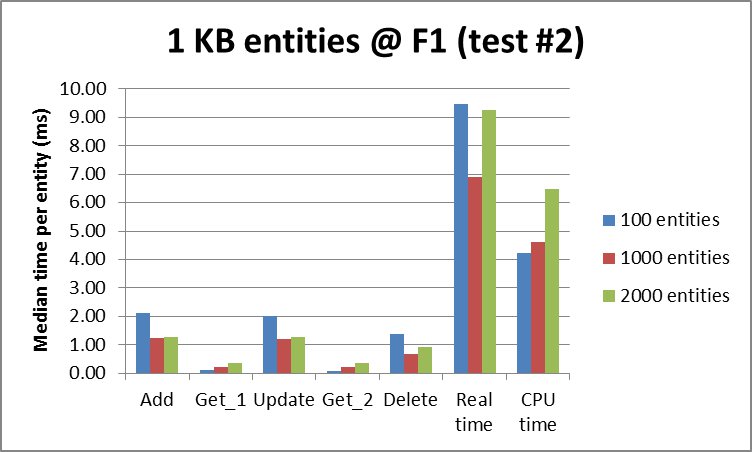
The first observation is that using the default F1 instance once we start fetching more than 100 entities or once we start to add/update/delete more than 1000 entities, we saturate the Datastore -> Objectify -> Java throughput and don’t scale any more:
App Engine Datastore median time per entity for 1 KB entities @ F1 instance

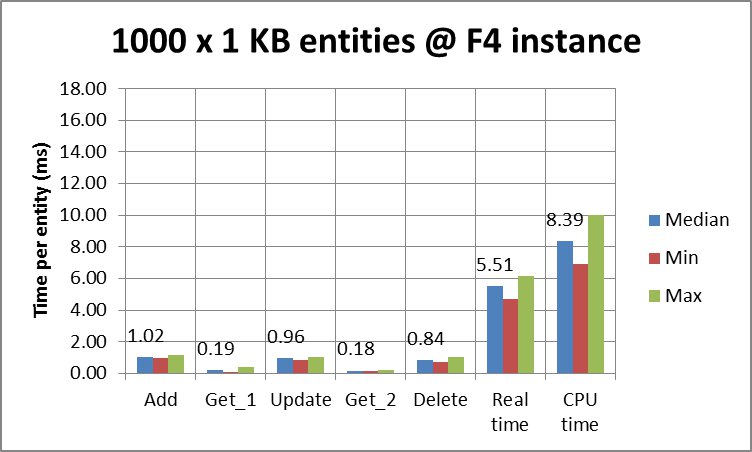
The other interesting observation is that the Datastore -> Objectify -> Java throughput depends a lot on the App Engine instance. That’s not a surprising fact because the application needs to serialize data back and forth when communicating with the Datastore. This requires CPU power. The following two charts show that more CPU power speeds up all operations where serializing is involved — that is all Datastore operations but the Delete one which only queries the Datastore by supplying the keys of the entities, no data:
App Engine Datastore times per entity for 1000 x 1 KB entities @ F1 instance

App Engine Datastore times per entity for 1000 x 1 KB entities @ F4 instance

It is unexpected that the App Engine and the Datastore still have good and bad days. Their latency as well as CPU accounting could fluctuate a lot. The following chart shows the benchmark results which we got using an F1 instance. If you compare this to the chart above where a much more expensive F4 instance was used, you’ll notice that the 4-times cheaper F1 instance performed almost as fast as an F4 instance:
App Engine Datastore times per entity for 1000 x 1 KB entities @ F1 instance (test on another day)

The source code and the raw results are available for download at http://www.famzah.net/download/gae-datastore-performance/


Leave a comment

Enable Forward Secrecy in Apache 2.4

The Heartbleed bug once again raised a very serious question — what happens if someone steals our SSL private key. The future actions are all clear — we revoke the key, change it on the server and we are secure. However any recorded past SSL encrypted sessions which the attacker posses can be decrypted to plain text using the stolen SSL private key.

The article “SSL: Intercepted today, decrypted tomorrow” explains the problem in great details. It also suggests who may take advantage of your stolen SSL private key.

Fortunately there is a solution to this attack vector. It is called Forward Secrecy and solves the problem by using a different private key to encrypt each new SSL session. If an attacker wanted to decrypt all your SSL sessions, the attacker would need to brute-force the private keys of each of your SSL sessions. While this attack vector still exists, current computing power is too small to solve such a task in a reasonable time. Note that Forward Secrecy is not new at all and was invented in 1992, pre-dating the SSL protocol by two years, as stated in the “SSL: Intercepted today, decrypted tomorrow” article.

Many websites and blogs recommend their own cipher list which needs to be used, in order to enable Perfect Secrecy, and at the same time to not be vulnerable to the BEAST attack. Trusting such long lists of ciphers without understanding all of them makes me a bit insecure. Luckily the OpenSSL vendors have created a special string which we can use to identify the TLS v1.2 specific ciphers — “TLSv1.2”. This makes your Apache configuration very readable and leaves the control in the OpenSSL developers who can update the ciphers accordingly:

SSLProtocol -ALL -SSLv2 +SSLv3 +TLSv1 +TLSv1.1 +TLSv1.2
SSLHonorCipherOrder on
SSLCipherSuite TLSv1.2:RC4:HIGH:!aNULL:!eNULL:!MD5
SSLCompression off

TraceEnable Off

The effect of this configuration is that for TLS v1.2 connections you will prefer the strong TLS v1.2 ciphers. For all other connections, like SSLv3 or TLS v1.0, the RC4 ciphers will be used which are required to protect against the BEAST attack. Note that TLS v1.2 does not suffer from the BEAST attack.

This configuration won’t give you Forward Secrecy for Internet Explorer. The explanation here says:
“Internet Explorer, in all versions, does not support the ECDHE and RC4 combination (which has the benefit of supporting Forward Secrecy and being resistant to BEAST). But IE has long patched the BEAST vulnerability and so we shouldn’t worry about it.”

It’s worth mentioning that using those strong TLS v1.2 ciphers may increase the CPU time required to establish a new SSL connection 3 times.


Real-time SSL test:

Resources:

Solutions:


Leave a comment

Cron job custom timezone

The default cron job daemon on Debian and Ubuntu does not support per-user timezones (see crontab(5) man page).

Here is a solution which runs hourly cron tasks in the timezone which you specified. For example, if you want to run “test.sh” at 5 AM and 7 PM in timezone Europe/Sofia, you need to create the following “cron.hourly” script:

#!/bin/bash
/path/to/run-at.sh 5,19 Europe/Sofia $(( 15*60 )) /var/run/run-at-test.state /path/to/test.sh

Here is the source code of “run-at.sh”:

#!/bin/bash
set -u

# XXX
# We work exclusively with global variables.
# Functions are used just to separate logic and for self-documenting.

function display_usage() {
	if [ "$1" -ge 5 ]; then
		return; # enough parameters
	fi

	cat >&2 <<EOF
Usage: $0 HOURS TZ WARN_TIME STATE_FILE COMMAND [ARGS...]
Runs COMMAND every day at the specified HOURS.

The execution is accounted and considered successful
only if COMMAND exits with 0. If there was no (successful)
execution within the WARN_TIME hours specified period,
a warning is being issued.

The STATE_FILE must pre-exist, so make sure that you
create it before the first run, or you will get a
warning.

This script is intended to be run in "cron.hourly".

Arguments:
 - HOURS -- comma-separated list; example: 5,12,19
 - TZ -- time zone; example: Europe/Sofia
 - WARN_TIME -- minutes; example: 360
 - STATE_FILE -- fill path to a writable file
 - COMMAND and ARGS to be executed on HOURS

Example:
 $0 5,19 Europe/Sofia \\
   \$(( 15*60 )) /root/.run-at-test.state \\
   date -d now +%c
EOF
	exit 1
}

function check_state_file_oldness() {
	# find file with mtime less than $WARN_TIME minutes
	if [ "$(find "$STATE_FILE" -type f -mmin -"$WARN_TIME")" != "$STATE_FILE" ]; then
		# file not found -> this will be indicated by 'find' on STDERR too
		# file is too old ("-mmin" condition not met)
		echo "WARNING: No successful run in the last $WARN_TIME minutes" >&2
	fi
}

function split_hours() {
	HOURS="${HOURS//,/ }" # replace "," with " "
	# https://blog.famzah.net/2013/02/17/
	#   bash-split-a-string-into-columns-by-white-space-without-invoking-sub-shells/
	HOURS=( $HOURS ) # now an ARRAY
}

function validate_tz() {
	# naive check; tested on Debian
	if [ ! -e "/usr/share/zoneinfo/$WANT_TZ" ]; then
		echo "ERROR: TZ seems to be invalid." >&2
		exit 1
	fi
}

function get_now_hour_in_tz() {
	NOW_HOUR="$(TZ="$WANT_TZ" date +%H)" # get current hour in 24h-format using the $WANT_TZ
}

function check_if_we_should_run_or_exit() {
	RUN=0
	for h in "${HOURS[@]}" ; do
		if [ "$h" -eq "$NOW_HOUR" ]; then
			RUN=1
			break
		fi
	done

	if [ "$RUN" -eq 0 ]; then
		exit 0
	fi
}

function execute_command_and_get_exit_code() {
	"$@" # execute the command
	EC="$?"
}

function update_state_file_mtime() {
	if [ "$EC" -eq 0 ]; then
		touch "$STATE_FILE"
	fi
}

#### ### ### ###

display_usage "$#"

# parse_argv

HOURS="$1" ; shift
WANT_TZ="$1" ; shift
WARN_TIME="$1" ; shift
STATE_FILE="$1" ; shift
# the rest in "$@" is the command to be executed

check_state_file_oldness

split_hours
validate_tz
get_now_hour_in_tz
check_if_we_should_run_or_exit

execute_command_and_get_exit_code "$@"
update_state_file_mtime


Leave a comment

C++: Use the right size for the right job

Do you want to speed up your C++ application up to 4 times? Read on.

Recently I happened to be on a summer holiday with a friend who is a C++ guru. We discussed my language performance benchmark post, which had just received a lot of attention in regards to C++. It took him a few hours to demonstrate something really important and often underestimated by developers — that we need to allocate only as much memory as needed, and nothing more.

The C++ algorithm which we use at the benchmark blog page uses an array of “int” (which on Linux also happens to be 4 bytes == 32 bits). However, if you review the code you’ll notice that the “int” value is used as a pure boolean variable for the given array index. So my friend proposed the following optimized version, which uses 1 bit of memory for the boolean value and thus doesn’t waste the other 31-bits left if we used “int” instead:

--- primes.cpp	2013-06-17 17:16:09.000000000 +0300
+++ primes-bool.cpp	2013-06-17 18:43:28.000000000 +0300
@@ -12,9 +12,9 @@
 		res.push_back(2);
 		return res;
 	}
-	vector<int> s;
+	vector<bool> s;
 	for (int i = 3; i < n + 1; i += 2) {
-		s.push_back(i);
+		s.push_back(true);
 	}
 	int mroot = sqrt(n);
 	int half = (int)s.size();
@@ -23,9 +23,9 @@
 	while (m <= mroot) {
 		if (s[i]) {
 			int j = (int)((m*m - 3)/2);
-			s[j] = 0;
+			s[j] = false;
 			while (j < half) {
-				s[j] = 0;
+				s[j] = false;
 				j += m;
 			}
 		}
@@ -33,9 +33,9 @@
 		m = 2*i + 3;
 	}
 	res.push_back(2);
-	for (vector<int>::iterator it = s.begin() ; it < s.end(); ++it) {
-		if (*it) {
-			res.push_back(*it);
+	for (size_t it = 0; it < s.size(); ++it) {
+		if (s[it]) {
+			res.push_back(2*it + 3);
 		}
 	}

The end result is that the original C++ implementation finishes for 18.913 CPU seconds, while the memory-optimized completes in 5.354 seconds (28%). Impressive!

The bottom line is that even RAM is very fast and memory allocation is efficient, using only as few memory as really needed could vastly improve the performance of your C++ application. Which applies for programs developed in any language.


13 Comments

Using flock() in Bash without invoking a subshell

The flock(1) utility on Linux manages flock(2) advisory locks from within shell scripts or the command line. This lets you synchronize your Bash scripts with all your other applications written in Perl, Python, C, etc.

I’ll focus on the third usage form where flock() is used inside a Bash script. Here is what the man page suggests:

#!/bin/bash

(
flock -s 200

# ... commands executed under lock ...

) 200>/var/lock/mylockfile

Unfortunately, this invokes a subshell which has the following drawbacks:

  • You cannot pass values to variables from the subshell in the main shell script.
  • There is a performance penalty.
  • The syntax coloring in “vim” does not work properly. 🙂

This motivated my colleague zImage to come up with a usage form which does not invoke a subshell in Bash:

#!/bin/bash

exec {lock_fd}>/var/lock/mylockfile || exit 1
flock -n "$lock_fd" || { echo "ERROR: flock() failed." >&2; exit 1; }

# ... commands executed under lock ...

flock -u "$lock_fd"

Note that you can skip the “flock -u “$lock_fd” unlock command if it is at the very end of your script. In such a case, your lock file will be unlocked once your process terminates.


Leave a comment

Google Reader alternative

Google announced that they are shutting down their online web RSS reader on July 1, 2013. What a shame, it was really useful and with a great web design.

After short research, I decided to code one — for fun and education. It’s designed to operate in a multi-user way, so if you want to give it a try, go on!

My online implementation is named “xs RSS reader“, short for extra-simple RSS reader:
http://www.famzah.net/xs-rss-reader/

Here is a sample demo screenshot:
xs RSS reader -- demo screenshot