/contrib/famzah

Enthusiasm never stops


5 Comments

Beware of leading zeros in Bash numeric variables

Suppose you have some (user) value in a numeric variable with leading zeros. For example, you number something with zero-padded numbers consisting of 3 digits: 001, 002, 003, and so on. This label is assigned to a Bash variable, named $N.

Until the numbers are below 008, and until you use the variable only in text interpolations, you’re safe. For example, the following works just fine:

N=016
echo "Value: $N"
# result is "016"

However… πŸ™‚
If you start using this variable as a numeric variable in arithmetics, then you’re in trouble. Here is an example:

N=016
echo $((N + 2))
# result is 16, not 18, as expected!
printf %d "$N"
# result is 14, not 16, as expected!

You probably already see the pattern – “016” is not treated as a decimal number, but as an octal one. Because of the leading zero. This is explained in the man page of bash, section “ARITHMETIC EVALUATION” (aka. “Shell Arithmetic”).

In order to force decimal representation and as a side effect also remove any leading zeros for a Bash variable, you need to treat it as follows:

N=016
N=$((10#$N)) # force decimal (base 10)
echo $((N + 2))
# result is 18, ok
printf %d "$N"
# result is 16, ok

Note also that there’s another caveat – forcing the number to decimal base 10 doesn’t actually validate that it contains only [0-9] characters. Read the very last paragraph of the man page of bash, section “ARITHMETIC EVALUATION” (aka. “Shell Arithmetic”), for more details on how digits can be represented by letters and symbols. My tests however show that you can’t operate with invalid numbers in base 10, though I’m no expert here. In order to be on the safe side, I would suggest that you validate your numbers with a strict regular expression, just in case, and if you don’t trust the data input.


Resources:


Leave a comment

Speed up RRDtool database manipulations via RRDs (Perl)

Use case
You are doing a lot of data operations on your RRD files (create, update, fetch, last), and every update is done by a separate Perl process which lives a very short time – the process is launched, it updates or reads the data, does something else, and then exits.

The problem
If you are using RRDtool and Perl as described, you surely have noticed that running many of these processes wastes a lot of CPU resources. The question is – can we do some performance optimizations, and lessen the performance hit of loading the RRDs library into Perl? We know that launching often Perl itself is quite expensive, but after all, if we chose to work with Perl, this is a price we should be ready to pay.

The RRDtool shared library is a monolithic piece of code which provides ALL functions of the RRDtool suite – data manipulation, graphics and import/export tools. The last two components bring huge dependencies in regards to other shared libraries. The library from RRDtool version 1.4.4 depends on 34 other libraries on my Linux box! This must add up to the loading time of the RRDtool library into Perl.

Resolution and benchmarks
In order to prove my theory (actually, it was more a theory of zImage, and I just followed, enhanced and tried it), I commented out the implementation of the “graphics” and “import/export tools” modules from the source code of RRDtool. Then I re-compiled the library and did some performance benchmarks. I also re-implemented the RRDs.pm module by replacing the DynaLoader module with the XSLoader one. This made no difference in performance whatsoever. The re-compiled RRD library depends on only 4 other libraries – linux-gate.so.1, libm.so.6, libc.so.6, and /lib/ld-linux.so.2. I think this is the most we can cut down. πŸ™‚

So here are the benchmark results. They show the accumulated time for 1000 invocations of the Perl interpreter with three different configurations:

  • Only Perl (baseline): 5.454s.
  • With RRDs, no graphics or import/export functions: 9.744s (+4.290s) +78%.
  • With standard RRDs: 11.647s (+6.192s) +113%.

As you can see, you can make Perl + RRDs start 35% faster. The speed up for RRDs itself is 44%.


Here are the commands I used for the benchmarks:

  • Only Perl (baseline): time ( i=1000 ; while [ “$i” -gt 0 ]; do perl -Mwarnings -Mstrict -e ” ; i=$(($i-1)); done )
  • Perl + RRDs: time ( i=1000 ; while [ “$i” -gt 0 ]; do perl -Mwarnings -Mstrict -MRRDs -e ” ; i=$(($i-1)); done )


Leave a comment

Free SSL certificates

More and more people start telling me about the StartSSL SSL authority, which is a daughter company of StartCom. The rumor that they are giving free SSL certificates looked too unbelievable to me, so I decided to review this more carefully.

After much reading at their page, what people say was confirmed – StartSSL really issue SSL certificates for free, when they are about to be used by individuals on their websites. This means that your personal name stays in the SSL certificate information which can be reviewed if you click on the SSL bar in your web browser.

Business or other legal entities verify their company’s information once for an annual fee and can then issue an unlimited count of SSL certificates too, including wild-card ones. Once verified, a business customer can purchase EV certificates for US$ 49.90 per year.

You can compare these prices with any other SSL certificate authority and you’ll see it yourself that StartSSL are the most affordable one, and the only one which doesn’t charge you for what doesn’t cost them money either – that’s why they can offer “loosely verified” SSL certificates for personal websites for free. It’s unbelievable but true.

My IT brain immediately started to doubt the technical side. I had to check if web browsers accept these SSL certificates without issuing an SSL warning about the certificate being signed by an unknown SSL authority. The test results were successful and the SSL root authority of StartSSL was recognized by the latest version of:

  • Internet Explorer 8 on Windows.
  • Chrome on Windows.
  • Firefox on Windows and Linux.
  • Chromium on Linux.

Furthermore, the Debian “lenny”, “squeeze” and Ubuntu Lucid CA repositories also recognize the StartSSL root certificate. You can verify this yourself by the following command:
openssl s_client -CApath /etc/ssl/certs -connect startssl.com:443

StartSSL have a long list with platforms and browsers which recognize their certificates. You can review the list at the products comparison page.

No more self-signed SSL certificates for personal use, hurray! πŸ™‚

Update 29/Nov/2010: If you’re interested, you can also review my success story with the Support staff of StartSSL.


34 Comments

The Super Micro IPMI Console + Java are killing me

I don’t know if it’s Java or the Super Micro IPMI developers to blame, or both. One thing is for sure – I rarely need it, but almost each time I want to use the server-critical “Console Redirection” feature on our Super Micro servers, there is some problem with the Java applet. Thus I’m not able to access the remote console of the server quickly, which in turn gets me real headache.

Today, it’s the “Launch Console” button doing absolutely nothing on my Kubuntu desktop – no errors, no action after clicking it, no nothing. I (always) have a “backup option” – a Windows 7 virtual machine running on my desktop, as Java tends to work better for me on Windows (cross-platform, eh?). Same problem on the Windows too. As I’m a real paranoid about having a backup, I have a backup of the “backup option” – X over VNC, running on
some not-so-bleeding-edge Linux machines, in order to have a “stable” Java installation there. Though the Java failed on them today as well, as they are running Debian “lenny”, which seems to be having the latest Java version 1.6.20 too.

Well… sorry Java applets + Super Micro IPMI, you really disappoint me! :-/

27/Mar/2012: Resolution: Use the IPMIView application which does not rely on web browsers. Tested with Java Version 6 Update 31 (build 1.6.0_31) on Windows 7. Note that IPMIView does not provide a KVM console for older versions of the Super Micro IPMI devices — the good news is that those devices work well within a web browser. πŸ™‚

The (ugly) fix is to downgrade your Java to 1.6.19 (and disable automatic Java updates):
http://www.webhostingtalk.com/showthread.php?t=953055

Update #1: I downgraded to Java 1.6.19 on my Windows 7 by:

  1. Uninstalling the Java 1.6.20 JRE update.
  2. Installing the Java 1.6.19 JRE update which I downloaded from the “Archive: Java[tm] Technology Products Download” page.
  3. Being able to get this working only with Chrome. Firefox and IE 8 failed to work.

Update #2: Linux doesn’t seem to be having any problems. Firefox 3.6.3 on Ubuntu and Gentoo with Sun Java 1.6.20 works fine.

Update #3: If you upgrade the IPMI firmware to version 2.02, the Windows problem is fixed.


Here is some debug info from the Debian “lenny” Iceweasel browser, the only one which issued an error:

Unable to launch ATEN Java iKVM Viewer.
An error occurred while launching/running the application.

Title: ATEN Java iKVM Viewer
Vendor: ATEN
Category: Download Error

Unable to load resource: (https://%IP%/iKVM.jar, 1.56.3.0×0)

Wrapped Exception: java.io.IOException: HTTP response 404.

At the same time, the Java test page works fine. The version on the Debian “lenny” “sun-java6-jre” package is “6-20-01lenny1” (Java JRE 1.6.20).

The same problem is re-produced on:

  • Windows 7, running Java 1.6.20, under IE 8, Firefox 3.6.3 and Chrome 5.0.375.99.
  • Kubuntu Lucid, running OpenJDK 6 build b18, under Firefox 3.6.3.

The Firmware Revision of the IPMI interface on the X8DTL motherboard is 01.29, dated 2010-01-06. It’s not the latest one, but surely not a very old one. After all, you can’t reboot your production servers for every IPMI firmware release…

Anyway, I try not to write articles with negative attitude, but this time I just couldn’t resist.
Java, Java, Java… πŸ™‚


23 Comments

OpenSSH ciphers performance benchmark

πŸ’‘ Please review the newer tests.


Ever wondered how to save some CPU cycles on a very busy or slow x86 system when it comes to SSH/SCP transfers?

Here is how we performed the benchmarks, in order to answer the above question:

  • 41 MB test file with random data, which cannot be compressed – GZip makes it only 1% smaller.
  • A slow enough system – Bifferboard. Bifferboard CPU power is similar to a Pentium @ 100Mhz.
  • The other system is using a dual-core Core2 Duo @ 2.26GHz, so we consider it fast enough, in order not to influence the results.
  • SCP file transfer over SSH using OpenSSH as server and client.

As stated at the Ubuntu man page of ssh_config, the OpenSSH client is using the following Ciphers (most preferred go first):

aes128-ctr,aes192-ctr,aes256-ctr,arcfour256,arcfour128,
aes128-cbc,3des-cbc,blowfish-cbc,cast128-cbc,aes192-cbc,
aes256-cbc,arcfour

In order to examine their performance, we will transfer the test file twice using each of the ciphers and note the transfer speed and delta. Here are the shell commands that we used:

for cipher in aes128-ctr aes192-ctr aes256-ctr arcfour256 arcfour128 aes128-cbc 3des-cbc blowfish-cbc cast128-cbc aes192-cbc aes256-cbc arcfour ; do
        echo "$cipher"
        for try in 1 2 ; do
                scp -c "$cipher" test-file root@192.168.100.102:
        done
done

You can review the raw results in the “ssh-cipher-speed-results.txt” file. The delta difference between the one and same benchmark test is within 16%-20%. Not perfect, but still enough for our tests.

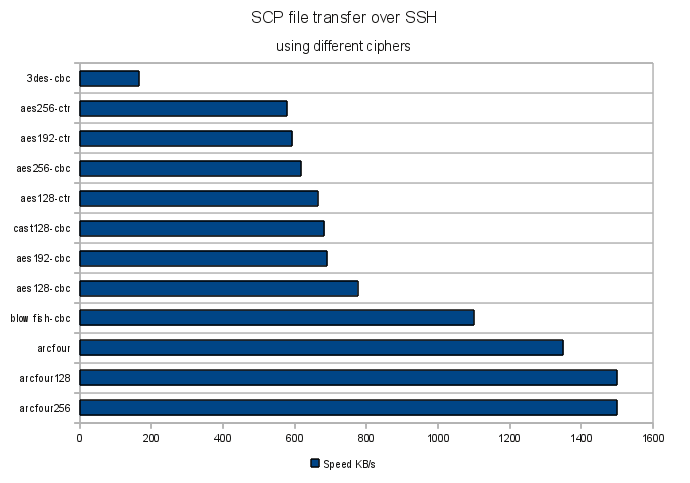
Here is a chart which visualizes the results:

The clear winner is Arcfour, while the slowest are 3DES and AES. Still the question if all OpenSSH ciphers are strong enough to protect your data remains.

It’s worth mentioning that the results may be architecture dependent, so test for your platform accordingly.
Also take a look at the below comment for the results of the “i7s and 2012 xeons” tests.


Resources:


1 Comment

Firefox 3.6 menu and right-click are slow on Kubuntu Lucid

If you have installed a fresh copy of Kubuntu Lucid as I did, on two different computers, and your Firefox main menus or right-click context menus are being shown slowly (i.e. take several seconds to appear), then I can tell you what it was not for me. And later I’ll tell you how I fixed it. πŸ™‚

It was not:

  • Firefox settings in “~/.mozilla”, add-ons or extensions. Disable/enable makes no difference.
  • nVidia drivers, or any other video drivers like ATI, etc, as you’ll see below.
  • GTK theme.
  • Custom fonts.
  • The Xorg server.
  • Anything I could easily spot via strace, because Firefox is very complicated for me.
  • Kubuntu theme.
  • Firefox safe-mode doesn’t help either.

I’ve tried it all. The problem was in the global network settings, and more exactly in “/etc/hosts“.
Logical, no? πŸ™‚

The fix: You need to make sure that “localhost” is defined properly for “127.0.0.1” and not defined for the IPv6 configuration like it was by default on my two newly set up Kubuntu boxes.

That’s a bad “/etc/hosts” file:

127.0.0.1       localhost

# The following lines are desirable for IPv6 capable hosts
::1     localhost ip6-localhost ip6-loopback
... (and so on)

That’s the fixed “/etc/hosts” file:

127.0.0.1       localhost

# The following lines are desirable for IPv6 capable hosts
::1     ip6-localhost ip6-loopback
... (and so on)

Pay attention that on line #1 there is “localhost” defined for “127.0.0.1”, and on line #4 there is no “localhost” for the IPv6 address “::1”.

Enjoy your faster Firefox.

Update: It seems that “localhost” must be defined for IPv6, according to the Ubuntu developers. This is discussed in Ubuntu Bug #301430: ipv6 /etc/hosts missing localhost hostname. I’ll leave it up to you to decide if you want to risk breaking your IPv6 or other functionality.

P.S. Also enjoy Steve Ballmer and his “Developers, developers, developers…”!


Resources:


4 Comments

Debug Debian or Ubuntu /etc/network/interfaces

Here is a debug idea for your Debian or Ubuntu server or network station, if you do fancy stuff with your network configuration, or if you are in trouble even with a standard configuration.

Let’s first review some documentation and namely the one of ifup(8) and ifdown(8). Here is an excerpt from it:

KNOWN BUGS/LIMITATIONS
The program keeps records of whether network interfaces are up or down. Under exceptional circumstances these records can become inconsistent with the real states of the interfaces.

Moreover, if the ifup(8) command fails in the middle/end of configuring an interface, then the interface is marked as “down” in the state database but is actually configured, i.e. its actual state is not reverted to a non-configured actually “down” interface. As a result, ifdown(8) doesn’t want to bring down the interface later, even though it’s configured to some point. Furthermore, if ifdown(8) fails in the middle of the de-configuration, you are not notified properly by an error message.

Why would you care so much? If all ifup(8) and ifdown(8) procedures don’t complete well, most probably `/etc/init.d/networking restart` will not work as expected, and you also won’t be able to bring up or down certain interfaces by calling “ifup $IFACE” or “ifdown $IFACE”.

Let’s see how we can have better control and debug info. Here is a somehow complicated “/etc/network/interfaces” example which could cause you some trouble and is not that easy to debug:

# The primary network interface
auto bond0
iface bond0 inet static
        address 192.168.7.13
        netmask 255.255.255.0
        network 192.168.7.0
        broadcast 192.168.7.255
        gateway 192.168.7.8
        pre-up /sbin/ifconfig eth0 up
        pre-up /sbin/ifconfig eth1 up
        pre-up echo bond0 > /sys/module/aoe/parameters/aoe_iflist
        pre-up echo 100 > /sys/class/net/bond0/bonding/miimon
        pre-up echo 1 > /sys/class/net/bond0/bonding/mode
        post-up /sbin/ifenslave bond0 eth0 eth1
        post-up /sbin/ip link set bond0 txqueuelen 1000
        down /sbin/ifenslave -d bond0 eth0 eth1
        post-down /sbin/ifconfig eth0 down
        post-down /sbin/ifconfig eth1 down

The problem in my case was that I used “post-down” instead of “down” for the “/sbin/ifenslave -d bond0 eth0 eth1” but that wasn’t obvious for me – I spent almost an hour trying to figure out why my “ifup” and “ifdown” (and the whole `/etc/init.d/networking` script on boot and restart) weren’t working as expected.

How can you debug it?
You can add a test for successfulness after each statement and also add one very final debug message in each “post-up” and “post-down” interfaces(5) section:

# The primary network interface
auto bond0
iface bond0 inet static
        address 192.168.7.13
        netmask 255.255.255.0
        network 192.168.7.0
        broadcast 192.168.7.255
        gateway 192.168.7.8
        pre-up /sbin/ifconfig eth0 up || echo FAILED break point 1
        pre-up /sbin/ifconfig eth1 up || echo FAILED break point 2
        pre-up echo bond0 > /sys/module/aoe/parameters/aoe_iflist || echo FAILED break point 3
        pre-up echo 100 > /sys/class/net/bond0/bonding/miimon || echo FAILED break point 4
        pre-up echo 1 > /sys/class/net/bond0/bonding/mode || echo FAILED break point 5
        post-up /sbin/ifenslave bond0 eth0 eth1 || echo FAILED break point 6
        post-up /sbin/ip link set bond0 txqueuelen 1000 || echo FAILED break point 7
        post-up echo Successful UP for interface $IFACE
        down /sbin/ifenslave -d bond0 eth0 eth1 || echo FAILED break point 8
        post-down /sbin/ifconfig eth0 down || echo FAILED break point 9
        post-down /sbin/ifconfig eth1 down || echo FAILED break point 10
        post-down echo Successful DOWN for interface $IFACE

Note the very last “post-up” and “post-down” debug statements which we added, they must always be the last “post-up” and “post-down” statements:

        ...
        post-up echo Successful UP for interface $IFACE
        ...
        post-down echo Successful DOWN for interface $IFACE

If you don’t see the “Successful UP for interface $IFACE” or “Successful DOWN for interface $IFACE” for each of the configured interfaces, then something with your network start-up script went wrong (`/etc/init.d/networking`).

The step-by-step debug statements (“… || echo FAILED break point XX”) should help you determine where exactly the problem was.

Note that the “echo” debug statements here will always exit successfully which will not interrupt your network script as it would have done it if the debug “echo” was missing.


2 Comments

Auto-flush both STDOUT and STDERR in Perl

Q: Why Perl warn() or other STDERR output is not shown/logged/saved/flushed into my log file?
A: You may have encountered the well-known feature of stream buffering which is enabled by default.

An excerpt from the perlvar documentation says that “…STDOUT will typically be line buffered if output is to the terminal and block buffered otherwise”. Thus it is always buffered, also for STDERR.

Usually people remember to set STDOUT as auto-flush, but you should enable this for STDERR as well, or else your messages to STDERR may not appear in your log file immediately, if you are redirecting STDERR to a file.

The following piece of code sets an auto-flush for both STDOUT and STDERR:

select(STDERR);
$| = 1;
select(STDOUT); # default
$| = 1;

The select() function and the $| variable are built-in for Perl and require no additional libraries to be included.

Alternatively, you can also use IO::Handle to achieve the same result:

use IO::Handle;
STDERR->autoflush(1);
STDOUT->autoflush(1);

I never realized why stream buffering for both STDOUT and STDERR is enabled by default for most scripting languages… But that’s just me.


References:


1 Comment

Firefox crashes with “terminate called after throwing an instance of ‘std::bad_alloc'”

If you are here, you probably are as desperate as I was. Though your system has plenty of memory, Firefox keeps crashing with the following error message:

terminate called after throwing an instance of 'std::bad_alloc'
  what():  std::bad_alloc
Aborted

You can see the above error either by starting “firefox” in your console terminal manually, or by reviewing the file “~/.xsession-errors”, if you are running KDE.

I ran Firefox several times in debug mode via “gdb” and every time the debug output lead me to the wrong direction. Here is a sample full backtrace output:

[New Thread 0xadbfeb70 (LWP 3763)]
[Thread 0xadbfeb70 (LWP 3763) exited]
[New Thread 0xadbfeb70 (LWP 3764)]
[Thread 0xadbfeb70 (LWP 3764) exited]
[New Thread 0xadbfeb70 (LWP 3765)]
[New Thread 0xae3ffb70 (LWP 3766)]
[Thread 0xadbfeb70 (LWP 3765) exited]
terminate called after throwing an instance of 'std::bad_alloc'
  what():  std::bad_alloc

Program received signal SIGABRT, Aborted.
0x00227422 in ?? ()
(gdb) bt full
#0  0x00227422 in ?? ()
No symbol table info available.
#1  0x002524d1 in *__GI_raise (sig=6) at ../nptl/sysdeps/unix/sysv/linux/raise.c:64
        resultvar = <value optimized out>
        pid = 3575796
        selftid = 3708
#2  0x00255932 in *__GI_abort () at abort.c:92
        act = {__sigaction_handler = {sa_handler = 0x7a3ff4, sa_sigaction = 0x7a3ff4}, sa_mask = {__val = {3221183748, 3086869600, 3221183704, 7933961,
              3221183688, 1154680, 3221183676, 8013772, 0, 3086866344, 5, 0, 1, 3221183640, 0, 3221183716, 1356543, 3577255, 3221183636, 3035204, 1,
              3086869160, 0, 3221183748, 3221183676, 3221183688, 0, 4294967295, 1359583, 3086869160, 3221183680, 4294967295}}, sa_flags = 8011764,
          sa_restorer = 0x14b2ff}
        sigs = {__val = {32, 0 <repeats 31 times>}}
#3  0x001cc4df in __gnu_cxx::__verbose_terminate_handler () at ../../../../src/libstdc++-v3/libsupc++/vterminate.cc:93
        terminating = true
        t = <value optimized out>
#4  0x001ca415 in __cxxabiv1::__terminate (handler=0x1cc390 <__gnu_cxx::__verbose_terminate_handler()>)
    at ../../../../src/libstdc++-v3/libsupc++/eh_terminate.cc:38
No locals.
#5  0x001ca452 in std::terminate () at ../../../../src/libstdc++-v3/libsupc++/eh_terminate.cc:48
No locals.
#6  0x001ca591 in __cxa_throw (obj=0xad2f9700, tinfo=0x1f97fc, dest=0x1caaf0 <~bad_alloc>) at ../../../../src/libstdc++-v3/libsupc++/eh_throw.cc:83
        header = <value optimized out>
#7  0x001cac0f in operator new (sz=2) at ../../../../src/libstdc++-v3/libsupc++/new_op.cc:58
        handler = <value optimized out>
        p = <value optimized out>
#8  0x001caced in operator new[] (sz=2) at ../../../../src/libstdc++-v3/libsupc++/new_opv.cc:32
No locals.
#9  0x012ead5c in gfxSkipChars::TakeFrom (this=0xbfff5f1c, aSkipCharsBuilder=0xbfff6f60) at ../../dist/include/thebes/gfxSkipChars.h:152
No locals.
#10 0x012e48fe in BuildTextRunsScanner::BuildTextRunForFrames (this=0xbfff8320, aTextBuffer=0xbfff7280) at nsTextFrameThebes.cpp:1713
        anySmallcapsStyle = 0
        textBreakPoints = {<nsTArray<int>> = {<nsTArray_base> = {static sEmptyHdr = {mLength = 0, mCapacity = 0, mIsAutoArray = 0},
              mHdr = 0xbfff7150}, <No data fields>},
          mAutoBuf = "\001\000\000\000\062\000\000\200\000\000\000\000\220z\377\277\354x\377\277\065\000\000\000\066\000\000\000\000\000\000\000\b\000\000\000\260q\377\277\254q\377\277\220q\377\277\000\202\066\260\030V\241\265\b@q\267\066\000\000\000\240\321\377\263\270\321\377\263\000\000\000\000\b\000\000\000\001\000\000\000\000\000\000\000\b\000\000\000\b\000\000\000\000\000\000\000\304i\005\255\b\000\000\000$\301 \255\364\017\274\001\240\321\377\263\b\000\000\000\254y\377\277\201E\225\001\354x\377\277\240\321\377\263\000\000\000\000\036\352\216\001\000\000\000\000\200g/\255\220z\377\277xr\377\277\256\371\247\001\000\000\000\000\220z\377\277(;\260\001\000\000\000\000\354x\377\277\254r\377\277\364\017\274\001tr\377\277\002\000\000\000<r\377\277"}
        currentTransformedTextOffset = 1
        finalUserData = 0xad2037cc
        userDataToDestroy = 0x0
        nextBreakIndex = 2904569804
        firstFrame = 0xad2037cc
        builder = {mBuffer = {<nsTArray<unsigned char>> = {<nsTArray_base> = {static sEmptyHdr = {mLength = 0, mCapacity = 0, mIsAutoArray = 0},
                mHdr = 0xbfff6f64}, <No data fields>},
            mAutoBuf = "\002\000\000\000\000\001\000\200\001\001\377\277\223\200\223\001\027m\271\000#\000\000\000\031\201\271\000\364\017\274\001<\000\000\000\000\000\000\000\274p\377\277\347\063\225\001\027m\271\000\324\302\355\267\031\201\271\000\256^\005\b@\300\355\267\240\246z\267\004\000\000\000\364\257\005\b\000@\006\255\000\000\000\255\fp\377\277\064u\005\b@\300\355\267\000\000\002\000\320o\377\277\000\000\000\000\062\000\000\200\000\000\000\000[]\005\b\225\351\216\001\240D\006\255\374\301\355\267 \000\000\000\217\350\216\001$p\377\277\002\000\000\000\274p\377\277\225\351\216\001\f\203\377\277\370\202\377\277,p\377\277\000\000\000\000\f\203\377\277\370\202\377\277lp\377\277\000\000\000\000\370\202\377\277\004\000\000\000\002\000\000\000\364\017\274\001,\203\377\277\000\000\000\000lp\377\277_\256.\001,\203\377\277\000\000\000\000\000\000\000\000\225\351\216\001\004", '\000' <repeats 11 times>"\217, \350\216\001\240\201\37---Type <return> to continue, or q <return> to quit---

After much try-and-error attempts, and also thoughts if my laptop’s memory wasn’t faulty or if the shared libraries on my disk weren’t somehow corrupted, I was finally able to track down the cause of this abnormal behavior:

BUG: The Security Device which the Siemens HiPath SIcurity Card API provided. You can read here why I use it.

The problem started somewhere around Firefox version 3.5.5 and later. If the security device dongle/card is not plugged in your computer, Firefox crashes at random pages.

The resolution
Create a second Firefox profile and install the Security Device only there, leaving the default Firefox profile with no Security Device capabilities. Thus if you want to use your online banking, you would need to close Firefox and then start it using the second profile. It’s not that bad, if you are a personal user like me who performs bank transactions relatively rarely.

The MozillaZine Knowledge Base has an excellent article about Firefox Profile Manager.


Leave a comment

“dd” sequential write performance tests on a raw block device may be incorrect

…if you use the inappropriate bytes size (bs) option. See the man page of dd for details on this option.

Hard disks have a typical block size of 512 bytes. LVM on the other hand creates its block devices with a block size of 4096 bytes. So it’s easy to get confused – even if you know that disks should be tested with blocks of 512 bytes, you shouldn’t test LVM block devices with a 512-bytes but with a 4096-bytes block size.

What happens if you make a write performance test by writing directly on the raw block device and you use the wrong bytes size (bs) option?

If you look at the “iostat” statistics, they will show lots of read requests too, when you are only writing. This is not what is expected when you do only writing.
The problem comes by the fact that when you are not using the proper block size for the raw block device, instead of writing whole blocks, you are writing partial blocks. This is however physically not possible – the block device can only write one whole block at a time. In order to update the data in only a part of a block, this block needs to be read back first, then modified with the new partial data in memory and finally written back as a whole block.

The total performance drop is about 3 times on the systems I tested. I’ve tested this on some hard disks and on an Areca RAID-6 volume.

So what’s the lesson here?

When you do sequential write performance tests with “dd” directly on the raw block device, make sure that you use the proper bytes size option, and verify that during the tests you see only write requests in the “iostat” statistics.

Physical hard disk example:

# Here is a bad example for a hard disk device
dd if=/dev/zero of=/dev/sdb1 bs=256 count=5000000

# Here is the proper usage, because /dev/sda physical block size is 512 bytes
dd if=/dev/zero of=/dev/sdb1 bs=512 count=5000000 

LVM block device example:

# Another bad example, this time for an LVM block device
dd if=/dev/zero of=/dev/sdb-vol/test bs=512 count=1000000

# Here is the proper usage, because the LVM block size is 4096 bytes
dd if=/dev/zero of=/dev/sdb-vol/test bs=4k count=1000000

Understanding the “iostat” output during a “dd” test:

Here is what “iostat” displays when you are not using the proper bytes size option (lots of read “r/s” and “rsec/s” requests):

Device:         rrqm/s   wrqm/s     r/s     w/s   rsec/s   wsec/s avgrq-sz avgqu-sz   await  svctm  %util
sdb               0.00  5867.40 3573.20   46.40 28585.60 47310.40 20.97   110.38   30.61   0.28 100.00
sdb1              0.00     0.00    0.00    0.00     0.00     0.00 0.00     0.00    0.00   0.00   0.00
sdb2              0.00  5867.40 3572.80   46.40 28582.40 47310.40 20.97   110.38   30.61   0.28 100.00
dm-2              0.00     0.00 3572.80 5913.80 28582.40 47310.40 8.00 13850.92 1465.43   0.11 100.00 

Here is what it should display (no read “r/s” or “rsec/s” requests at all):

Device:         rrqm/s   wrqm/s     r/s     w/s   rsec/s   wsec/s avgrq-sz avgqu-sz   await  svctm  %util
sdb               0.00 16510.00    0.00  128.60     0.00 131686.40 1024.00   107.82  840.32   7.78 100.00
sdb1              0.00     0.00    0.00    0.00     0.00     0.00 0.00     0.00    0.00   0.00   0.00
sdb2              0.00 16510.00    0.00  128.60     0.00 131686.40 1024.00   107.82  840.32   7.78 100.00
dm-2              0.00     0.00    0.00 16640.00     0.00 133120.00 8.00 13674.86  823.73   0.06 100.00 

How to be safe?

Fortunately, file systems are smart enough and pay attention to the block size of the block devices they were mounted on. So if you do a “dd” write performance test and write to a file, you should be fine. Though in this case there are some other complications like journaling, commit intervals, barriers, mount options, etc.